@@ -4,165 +4,181 @@ createTime: 2025/05/24 23:43:26
permalink: /pro/selectusercom/
---
SelectUsersCom是一个用于选择用户或角色的基础组件。如下图 :
SelectUsersCom是一个用于选择用户或角色的组件,提供了两种使用方式 :
1. 对话框模式 (index.vue)
2. 输入框触发模式 (indexwithinput.vue)


一般通过按钮触发弹框进行选择,如下:
## 基础对话框组件 (index.vue)
``` vue
< el-button @click ="selectDialog = true" > 选择用户 < / el -button >
< el-dialog :destroy-on-close = "true" width = "850px" title = "选择用户" v-model = "selectDialog" >
< selectUsersCom v-if = "selectDialog" :ignore-auth="ignoreAuth" v-model:show="selectDialog" :loginKey="'loginUser'"
v -model :users = "selectUsers" v -model :userNames = "names" > < / selectUsersCom >
< / el-dialog >
### 组件功能
- 支持选择用户或角色
- 支持组织树结构浏览
- 支持搜索功能
- 支持分页显示
- 支持已选项目可视化管理
< script setup >
import { ref } from 'vue'
import SelectUsersCom from '@/components/SelectUsersCom/index.vue'
const selectDialog = ref ( false )
const selectUsers = ref ( [ ] )
const names = ref ( '' )
const ignoreAuth = ref ( false )
< / script >
```
还有一种通过输入框触发弹框进行选择,这时需要回填数据到文本框中。如下:
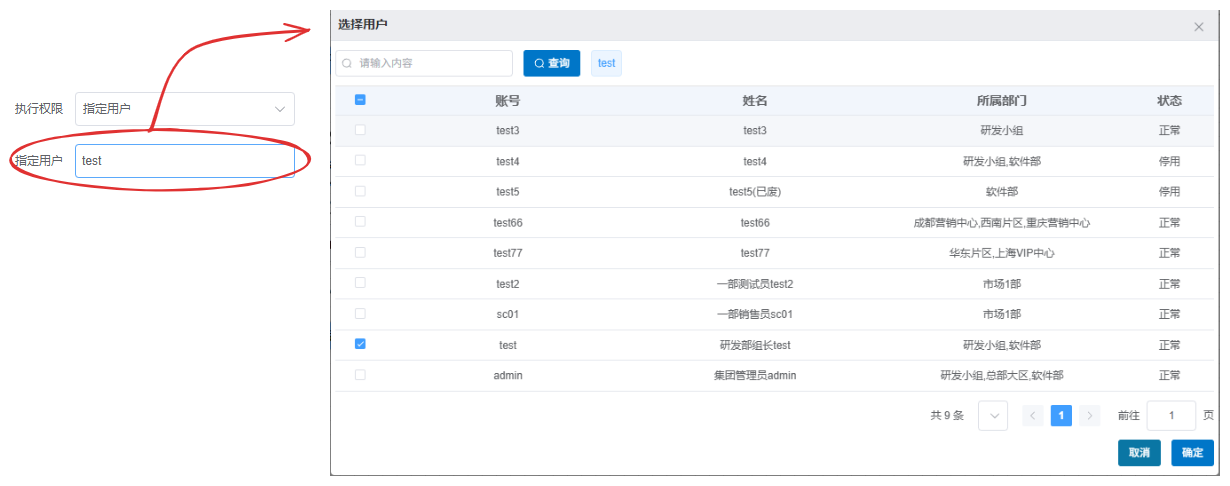
``` vue
< el-input @click ="selectDialog = true" readonly v-model = "names" :placeholder="placeholder" > < / el -input >
< el-dialog :destroy-on-close = "true" width = "850px" title = "选择用户" v-model = "selectDialog" >
< selectUsersCom v-if = "selectDialog" :ignore-auth="ignoreAuth" v-model:show="selectDialog" :loginKey="'loginUser'"
v -model :users = "selectUsers" v -model :userNames = "names" > < / selectUsersCom >
< / el-dialog >
< script setup >
import { ref } from 'vue'
import SelectUsersCom from '@/components/SelectUsersCom/index.vue'
const selectDialog = ref ( false )
const selectUsers = ref ( [ ] )
const names = ref ( '' )
const ignoreAuth = ref ( false )
< / script >
```
为了方便使用,我们在`SelectUsersCom` 组件的基础上封装了`/components/SelectUsersCom/dialog.vue` 组件用于带文本框的场景。使用如下:
``` vue
< select-users v -model :userNames = "names" :users = "users" :ignore-auth = "true" > < / select-users >
< script setup >
import { ref } from 'vue'
import SelectUsersDialog from '@/components/SelectUsersCom/dialog.vue'
const names = ref ( '' )
const roles = ref ( [ ] )
< / script >
```
## 属性
### 属性说明
| 属性名 | 类型 | 默认值 | 说明 |
| --- | --- | --- | --- |
| show | Boolean | false | 控制组件显示/隐藏 |
| loginKey | String | - | 选择类型,'login User'表示选择用户,其他值 表示选择角色 |
| orgId | String | - | 组织ID, 侧 树状结构 |
| ignoreAuth | Boolean | false | 是否忽略登录用户权限,直接获取全部数据,用于可以跨部门选择用户、角色的场景 |
| hiddenFoot er | Boolean | false | 是否隐藏底部的确定/取消按钮 |
| userNames | String | - | 已选用户/角色名称,逗号分隔 |
| users | Array | [] | 已选用户/角色ID列表 |
| ignoreAuth | Boolean | false | 是否忽略登录用户权限,直接获取全部数据 |
| selectType | String | 'User' | 选择类型,'User'表示选择用户,'Role' 表示选择角色 |
| orgId | String | - | 组织ID, 边 树状结构 |
| userNames | String | - | 用户名称(逗号分隔) |
| us ers | Object | - | 初始选中项ID列表或对象列表 |
| inType | String | 'id' | 父级传入的是id列表还是对象列表, |
| modelValue | Boolean | false | 控制对话框显示 |
## 事件
### 事件说明
| 事件名 | 说明 | 回调参数 |
| --- | --- | --- |
| update:show | 组件显示状态变化时触发 | (show: Boolean) |
| update:userNames | 选择的用户/角色名称变化时触发 | (userNames: String) |
| update:users | 选择的用户/角色ID变化时触发 | (users: Array) |
| 事件名 | 说明 |
| --- | --- |
| update:userNames | 更新用户名称 |
| update:users | 更新用户列表 |
| save | 保存选择结果 |
| update:modelValue | 更新对话框显示状态 |
## 方法
| 方法名 | 说明 | 参数 |
| --- | --- | --- |
| handleSaveUsers | 保存已选中的用户/角色,
## 更多示例
### 选择角色
### 使用示例
``` vue
< el-input @click ="selectDialog = true" readonly v-model = "names" :placeholder="placeholder" > < / el -input >
< el-dialog :destroy-on-close = "true" width = "850px" title = "选择角色" v-model = "selectDialog" >
< selectUsersCom v-if = "selectDialog" :ignore-auth="ignoreAuth" v-model:show="selectDialog" :loginKey="'loginRole'"
v -model :users = "selectRoles" v -model :userNames = "names" > < / s electUsersCom>
< / el-d ialog>
< template >
< el-button @click ="showDialog = true" > 选择用户 < / el -button >
< S electUsersCom
v-model = "showD ialog"
:ignore-auth = "true"
select -type = " User "
v -model :users = "selectedUsers"
v -model :userNames = "selectedNames"
@save ="handleSave"
/ >
< / template >
< script setup >
import { ref } from 'vue'
import SelectUsersCom from '@/components/SelectUsersCom/index.vue'
const select Dialog = ref ( false )
const selectRole s = ref ( [ ] )
const n ames= ref ( '' )
const ignoreAuth = ref ( false )
const show Dialog = ref ( false )
const selectedUser s = ref ( [ ] )
const selectedN ames= ref ( '' )
const handleSave = ( ) => {
console . log ( '已选用户ID:' , selectedUsers . value )
console . log ( '已选用户名称:' , selectedNames . value )
}
< / script >
```
为了方便使用,我们在`SelectUsersCom` 组件的基础上封装了`SelectRoles` 组件用于选择角色。使用如下:
## 输入框触发模式 (indexwithinput.vue)
### 组件功能
- 默认显示为输入框
- 点击输入框弹出选择对话框
- 支持根据用户ID自动获取用户姓名
- 支持选择用户并回显名称
### 属性说明
| 属性名 | 类型 | 默认值 | 说明 |
| --- | --- | --- | --- |
| users | Array/String | - | 用户ID列表或单个用户ID |
| userNames | String | '' | 用户名称(逗号分隔) |
| placeholder | String | '' | 输入框占位符 |
| ignoreAuth | Boolean | false | 是否忽略权限限制 |
### 事件说明
| 事件名 | 说明 |
| --- | --- |
| users-change | 用户选择变更时触发,参数为('users', 选中的用户ID列表)或('Texts', 选中的用户名称) |
### 使用示例
``` vue
< select-roles v -model :userNames = "names" :roles = "roles" :ignore-auth = "true" > < / select-roles >
< template >
< SelectUsersComInput
:users = "selectedUserIds"
:user-names = "selectedUserNames"
placeholder = "请选择用户"
:ignore-auth = "true"
@ users -change = " handleUsersChange "
/ >
< / template >
< script setup >
import { ref } from 'vue'
import SelectRoles from '@/components/SelectRoles/index .vue'
import SelectUsersComInput from '@/components/SelectUsersCom/indexwithinput .vue'
const name s= ref ( '' )
const rol es= ref ( [ ] )
const selectedUserId s= ref ( [ 'user1' , 'user2' ] )
const selectedUserNam es= ref ( '张三,李四' )
const handleUsersChange = ( type , value ) => {
if ( type === 'users' ) {
selectedUserIds . value = value
} else if ( type === 'Texts' ) {
selectedUserNames . value = value
}
}
< / script >
```
### 不显示底部按钮,
## 角色选择输入框 (SelectRoles/indexwithinput.vue)
### 组件功能
- 基于SelectUsersCom实现的角色选择器
- 默认显示为输入框
- 点击输入框弹出选择角色对话框
### 属性说明
| 属性名 | 类型 | 默认值 | 说明 |
| --- | --- | --- | --- |
| roles | Array | - | 角色ID列表 |
| userNames | String | - | 角色名称(逗号分隔) |
| placeholder | String | - | 输入框占位符 |
| ignoreAuth | Boolean | false | 是否忽略权限限制 |
### 事件说明
| 事件名 | 说明 |
| --- | --- |
| roles-change | 角色选择变更时触发,参数为('roles', 选中的角色ID列表)或('Texts', 选中的角色名称) |
### 使用示例
``` vue
< el-dialog width = "80%" draggable :title = "'选择用户'" v-model = "dialogSelectUser" >
< s electUsersCom ref = "selectUserRef" v-if = "dialogSelectUser" :hiddenFooter="true" :loginKey="'loginUser'"
v -model :users = "selectUsers" > < / selectUsersCom >
< template v -slot : footer >
< div style = "text-align: right" >
< el-button size = "small" type = "info" @click ="dialogSelectUser = false" >
取消
< / el -button >
< el-button size = "small" type = "primary" @click ="handleSaveUsers" >
确定
< / el -button >
< / div >
< / template >
< / el-dialog >
< template >
< S electRolesInput
:roles = "selectedRoleIds"
:user-names = "selectedRoleNames"
placeholder = "请选择角色"
:ignore-auth = "true"
@ roles -change = " handleRolesChange "
/ >
< / template >
< script setup >
import { ref } from 'vue'
import SelectUsersCom from '@/components/SelectUsersCom/index .vue'
import SelectRolesInput from '@/components/SelectRoles/indexwithinput .vue'
const selectUserRef = ref ( null )
const dialogSelectUser = ref ( false )
const selectUsers = ref ( [ ] )
const selectedRoleIds = ref ( [ 'role1' , 'role2' ] )
const selectedRoleNames = ref ( '管理员,操作员' )
//确定添加的用户
const handleSaveUsers = ( ) => {
selectUserRef . value . handleSaveUsers ( )
dialogSelectUser . value = false
const handleRolesChange = ( type , value ) => {
if ( type === 'roles' ) {
selectedRoleIds . value = value
} else if ( type === 'Texts' ) {
selectedRoleNames . value = value
}
}
< / script >
```
## 注意事项
1. 当`ignoreAuth` 为`true` 时,将调用`loadAll` 接口获取所有数据,否则调用`getList` 接口获取有权限的数据
, , `:destroy-on-close="true"` ,
2. 选择用户时可以通过组织树进行筛选,也可以直接搜索
3. ignoreAuth属性可以控制是否忽略用户权限限制,
4. 组件内部会自动处理用户ID和用户名称的映射关系