mirror of
https://github.com/UglyToad/PdfPig.git
synced 2026-03-10 00:23:29 +08:00
Compare commits
1 Commits
rewrite-re
...
additional
| Author | SHA1 | Date | |
|---|---|---|---|

|
21f1cd5354 |
66
README.md
66
README.md
@@ -2,11 +2,19 @@
|
||||
|
||||
# PdfPig
|
||||
|
||||
[](https://gitter.im/pdfpig/community?utm_source=badge&utm_medium=badge&utm_campaign=pr-badge)
|
||||
[](https://www.nuget.org/packages/PdfPig/)
|
||||
|
||||
[](https://github.com/UglyToad/PdfPig/actions/workflows/build_and_test.yml)
|
||||
[![Build and test [MacOS]](https://github.com/UglyToad/PdfPig/actions/workflows/build_and_test_macos.yml/badge.svg)](https://github.com/UglyToad/PdfPig/actions/workflows/build_and_test_macos.yml)
|
||||
|
||||
PdfPig supports reading text and content from PDF files. It also supports basic PDF file creation.
|
||||
This project allows users to read and extract text and other content from PDF files. In addition the library can be used to create simple PDF documents
|
||||
containing text and geometrical shapes.
|
||||
|
||||
This project aims to port [PDFBox](https://github.com/apache/pdfbox) to C#.
|
||||
|
||||
## Wiki
|
||||
Check out our [wiki](https://github.com/UglyToad/PdfPig/wiki) for more examples and detailed guides on the API.
|
||||
|
||||
## Installation
|
||||
|
||||
@@ -24,26 +32,29 @@ While the version is below 1.0.0 minor versions will change the public API witho
|
||||
|
||||
See the [wiki](https://github.com/UglyToad/PdfPig/wiki) for more examples
|
||||
|
||||
### Reading text from a PDF
|
||||
|
||||
### Read words in a page
|
||||
The simplest usage at this stage is to open a document, reading the words from every page:
|
||||
|
||||
```cs
|
||||
// using UglyToad.PdfPig.DocumentLayoutAnalysis.TextExtractor;
|
||||
// using UglyToad.PdfPig.DocumentLayoutAnalysis.WordExtractor;
|
||||
using (PdfDocument document = PdfDocument.Open(@"C:\Documents\document.pdf"))
|
||||
{
|
||||
foreach (Page page in document.GetPages())
|
||||
{
|
||||
string text = ContentOrderTextExtractor.GetText(page);
|
||||
IEnumerable<Word> words = page.GetWords(NearestNeighbourWordExtractor.Instance);
|
||||
}
|
||||
foreach (Page page in document.GetPages())
|
||||
{
|
||||
string pageText = page.Text;
|
||||
|
||||
foreach (Word word in page.GetWords())
|
||||
{
|
||||
Console.WriteLine(word.Text);
|
||||
}
|
||||
}
|
||||
}
|
||||
```
|
||||
|
||||
You **should not** use `page.Text` directly, unless you know what you're doing. The `Text` property preserves the internal content order which is rarely ever the text in the order you want.
|
||||
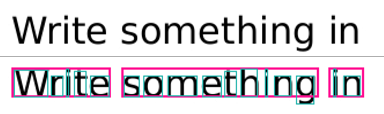
An example of the output of this is shown below:
|
||||
|
||||
These layout analysis tools should get you the text you want in most cases.
|
||||
|
||||
|
||||
Where for the PDF text ("Write something in") shown at the top the 3 words (in pink) are detected and each word contains the individual letters with glyph bounding boxes.
|
||||
|
||||
### Create PDF Document
|
||||
To create documents use the class `PdfDocumentBuilder`. The Standard 14 fonts provide a quick way to get started:
|
||||
@@ -69,12 +80,6 @@ The output is a 1 page PDF document with the text "Hello World!" in Helvetica ne
|
||||
|
||||
Each font must be registered with the `PdfDocumentBuilder` prior to use enable pages to share the font resources. Only Standard 14 fonts and TrueType fonts (.ttf) are supported.
|
||||
|
||||
Document creation supports very limited changes to existing PDF documents. However it does not support any of the following:
|
||||
|
||||
- Editing forms
|
||||
- Copying or changing annotations, metadata or document structure data
|
||||
- Adding or removing text with existing fonts
|
||||
|
||||
### Advanced Document Extraction
|
||||
In this example a more advanced document extraction is performed. `PdfDocumentBuilder` is used to create a copy of the pdf with debug information (bounding boxes and reading order) added.
|
||||
|
||||
@@ -254,7 +259,7 @@ string title = document.Information.Title;
|
||||
|
||||
### Document Structure
|
||||
|
||||
The `PdfDocument` has a Structure member:
|
||||
The document now has a Structure member:
|
||||
|
||||
UglyToad.PdfPig.Structure structure = document.Structure;
|
||||
|
||||
@@ -278,7 +283,7 @@ PageSize size = Page.Size;
|
||||
bool isA4 = size == PageSize.A4;
|
||||
```
|
||||
|
||||
`Page` provides access to the text of the page but you should use `ContentOrderTextExtractor` or alternatives if indexing the text, e.g. for RAG/LLMs:
|
||||
`Page` provides access to the text of the page:
|
||||
|
||||
string text = page.Text;
|
||||
|
||||
@@ -324,7 +329,7 @@ Retrieving annotations on each page is provided using the method:
|
||||
|
||||
page.GetAnnotations()
|
||||
|
||||
This call is not cached and the document must not have been disposed prior to use. Annotations cannot be edited.
|
||||
This call is not cached and the document must not have been disposed prior to use.
|
||||
|
||||
### Bookmarks
|
||||
|
||||
@@ -352,8 +357,6 @@ A page has a method to extract hyperlinks (annotations of link type):
|
||||
|
||||
IReadOnlyList<UglyToad.PdfPig.Content.Hyperlink> hyperlinks = page.GetHyperlinks();
|
||||
|
||||
Hyperlinks cannot be added or edited when building documents.
|
||||
|
||||
### TrueType
|
||||
|
||||
The classes used to work with TrueType fonts in the PDF file are available for public consumption. Given an input file:
|
||||
@@ -393,17 +396,18 @@ var resultFileBytes = PdfMerger.Merge(filePath1, filePath2);
|
||||
File.WriteAllBytes(@"C:\pdfs\outputfilename.pdf", resultFileBytes);
|
||||
```
|
||||
|
||||
## Wiki
|
||||
Check out our [wiki](https://github.com/UglyToad/PdfPig/wiki) for more examples and detailed guides on the API.
|
||||
|
||||
## Issues
|
||||
|
||||
Please do file an issue if you encounter a bug. See our [issue policy](https://github.com/UglyToad/PdfPig/issues/1095) and [contributing guide](https://github.com/UglyToad/PdfPig/blob/master/CONTRIBUTING.md) for details.
|
||||
|
||||
## API Reference
|
||||
|
||||
If you wish to generate doxygen documentation, run `doxygen doxygen-docs` and open `docs/doxygen/html/index.html`.
|
||||
|
||||
See also the [wiki](https://github.com/UglyToad/PdfPig/wiki) for a detailed documentation on parts of the API
|
||||
|
||||
## Issues
|
||||
|
||||
Please do file an issue if you encounter a bug.
|
||||
|
||||
However in order for us to assist you, you **must** provide the file which causes your issue. Please host this in a publically available place.
|
||||
|
||||
## Credit
|
||||
|
||||
This project started as an effort to port [PDFBox](https://github.com/apache/pdfbox) to C#. This project wouldn't be possible without the work done by the [PDFBox](https://pdfbox.apache.org/) team and the Apache Foundation.
|
||||
This project wouldn't be possible without the work done by the [PDFBox](https://pdfbox.apache.org/) team and the Apache Foundation.
|
||||
|
||||
@@ -32,7 +32,7 @@
|
||||
|
||||
public virtual string GetNameByStringId(int stringId)
|
||||
{
|
||||
return GlyphIdToStringIdAndName.SingleOrDefault(x => x.Value.stringId == stringId).Value.name;
|
||||
return GlyphIdToStringIdAndName.FirstOrDefault(x => x.Value.stringId == stringId).Value.name;
|
||||
}
|
||||
|
||||
public virtual int GetStringIdByGlyphId(int glyphId)
|
||||
|
||||
@@ -44,6 +44,25 @@
|
||||
return handler.Generate(dictionary);
|
||||
}
|
||||
|
||||
// Try simple font recovery:
|
||||
NameToken[] orderedFallbacks = [NameToken.Type1, NameToken.TrueType];
|
||||
foreach (var fallback in orderedFallbacks)
|
||||
{
|
||||
if (!handlers.TryGetValue(fallback, out handler))
|
||||
{
|
||||
continue;
|
||||
}
|
||||
|
||||
try
|
||||
{
|
||||
return handler.Generate(dictionary);
|
||||
}
|
||||
catch (Exception ex)
|
||||
{
|
||||
log?.Error($"Tried to parse font as fallback type: {fallback}", ex);
|
||||
}
|
||||
}
|
||||
|
||||
throw new NotImplementedException($"Parsing not implemented for fonts of type: {subtype}, please submit a pull request or an issue.");
|
||||
}
|
||||
}
|
||||
|
||||
Reference in New Issue
Block a user