mirror of
https://github.com/UglyToad/PdfPig.git
synced 2026-03-10 00:23:29 +08:00
Compare commits
1 Commits
rewrite-re
...
improve-nu
| Author | SHA1 | Date | |
|---|---|---|---|

|
45cf9745a3 |
66
README.md
66
README.md
@@ -2,11 +2,19 @@
|
||||
|
||||
# PdfPig
|
||||
|
||||
[](https://gitter.im/pdfpig/community?utm_source=badge&utm_medium=badge&utm_campaign=pr-badge)
|
||||
[](https://www.nuget.org/packages/PdfPig/)
|
||||
|
||||
[](https://github.com/UglyToad/PdfPig/actions/workflows/build_and_test.yml)
|
||||
[![Build and test [MacOS]](https://github.com/UglyToad/PdfPig/actions/workflows/build_and_test_macos.yml/badge.svg)](https://github.com/UglyToad/PdfPig/actions/workflows/build_and_test_macos.yml)
|
||||
|
||||
PdfPig supports reading text and content from PDF files. It also supports basic PDF file creation.
|
||||
This project allows users to read and extract text and other content from PDF files. In addition the library can be used to create simple PDF documents
|
||||
containing text and geometrical shapes.
|
||||
|
||||
This project aims to port [PDFBox](https://github.com/apache/pdfbox) to C#.
|
||||
|
||||
## Wiki
|
||||
Check out our [wiki](https://github.com/UglyToad/PdfPig/wiki) for more examples and detailed guides on the API.
|
||||
|
||||
## Installation
|
||||
|
||||
@@ -24,26 +32,29 @@ While the version is below 1.0.0 minor versions will change the public API witho
|
||||
|
||||
See the [wiki](https://github.com/UglyToad/PdfPig/wiki) for more examples
|
||||
|
||||
### Reading text from a PDF
|
||||
|
||||
### Read words in a page
|
||||
The simplest usage at this stage is to open a document, reading the words from every page:
|
||||
|
||||
```cs
|
||||
// using UglyToad.PdfPig.DocumentLayoutAnalysis.TextExtractor;
|
||||
// using UglyToad.PdfPig.DocumentLayoutAnalysis.WordExtractor;
|
||||
using (PdfDocument document = PdfDocument.Open(@"C:\Documents\document.pdf"))
|
||||
{
|
||||
foreach (Page page in document.GetPages())
|
||||
{
|
||||
string text = ContentOrderTextExtractor.GetText(page);
|
||||
IEnumerable<Word> words = page.GetWords(NearestNeighbourWordExtractor.Instance);
|
||||
}
|
||||
foreach (Page page in document.GetPages())
|
||||
{
|
||||
string pageText = page.Text;
|
||||
|
||||
foreach (Word word in page.GetWords())
|
||||
{
|
||||
Console.WriteLine(word.Text);
|
||||
}
|
||||
}
|
||||
}
|
||||
```
|
||||
|
||||
You **should not** use `page.Text` directly, unless you know what you're doing. The `Text` property preserves the internal content order which is rarely ever the text in the order you want.
|
||||
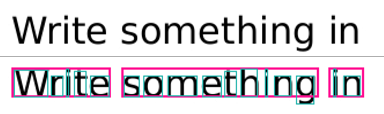
An example of the output of this is shown below:
|
||||
|
||||
These layout analysis tools should get you the text you want in most cases.
|
||||
|
||||
|
||||
Where for the PDF text ("Write something in") shown at the top the 3 words (in pink) are detected and each word contains the individual letters with glyph bounding boxes.
|
||||
|
||||
### Create PDF Document
|
||||
To create documents use the class `PdfDocumentBuilder`. The Standard 14 fonts provide a quick way to get started:
|
||||
@@ -69,12 +80,6 @@ The output is a 1 page PDF document with the text "Hello World!" in Helvetica ne
|
||||
|
||||
Each font must be registered with the `PdfDocumentBuilder` prior to use enable pages to share the font resources. Only Standard 14 fonts and TrueType fonts (.ttf) are supported.
|
||||
|
||||
Document creation supports very limited changes to existing PDF documents. However it does not support any of the following:
|
||||
|
||||
- Editing forms
|
||||
- Copying or changing annotations, metadata or document structure data
|
||||
- Adding or removing text with existing fonts
|
||||
|
||||
### Advanced Document Extraction
|
||||
In this example a more advanced document extraction is performed. `PdfDocumentBuilder` is used to create a copy of the pdf with debug information (bounding boxes and reading order) added.
|
||||
|
||||
@@ -254,7 +259,7 @@ string title = document.Information.Title;
|
||||
|
||||
### Document Structure
|
||||
|
||||
The `PdfDocument` has a Structure member:
|
||||
The document now has a Structure member:
|
||||
|
||||
UglyToad.PdfPig.Structure structure = document.Structure;
|
||||
|
||||
@@ -278,7 +283,7 @@ PageSize size = Page.Size;
|
||||
bool isA4 = size == PageSize.A4;
|
||||
```
|
||||
|
||||
`Page` provides access to the text of the page but you should use `ContentOrderTextExtractor` or alternatives if indexing the text, e.g. for RAG/LLMs:
|
||||
`Page` provides access to the text of the page:
|
||||
|
||||
string text = page.Text;
|
||||
|
||||
@@ -324,7 +329,7 @@ Retrieving annotations on each page is provided using the method:
|
||||
|
||||
page.GetAnnotations()
|
||||
|
||||
This call is not cached and the document must not have been disposed prior to use. Annotations cannot be edited.
|
||||
This call is not cached and the document must not have been disposed prior to use.
|
||||
|
||||
### Bookmarks
|
||||
|
||||
@@ -352,8 +357,6 @@ A page has a method to extract hyperlinks (annotations of link type):
|
||||
|
||||
IReadOnlyList<UglyToad.PdfPig.Content.Hyperlink> hyperlinks = page.GetHyperlinks();
|
||||
|
||||
Hyperlinks cannot be added or edited when building documents.
|
||||
|
||||
### TrueType
|
||||
|
||||
The classes used to work with TrueType fonts in the PDF file are available for public consumption. Given an input file:
|
||||
@@ -393,17 +396,18 @@ var resultFileBytes = PdfMerger.Merge(filePath1, filePath2);
|
||||
File.WriteAllBytes(@"C:\pdfs\outputfilename.pdf", resultFileBytes);
|
||||
```
|
||||
|
||||
## Wiki
|
||||
Check out our [wiki](https://github.com/UglyToad/PdfPig/wiki) for more examples and detailed guides on the API.
|
||||
|
||||
## Issues
|
||||
|
||||
Please do file an issue if you encounter a bug. See our [issue policy](https://github.com/UglyToad/PdfPig/issues/1095) and [contributing guide](https://github.com/UglyToad/PdfPig/blob/master/CONTRIBUTING.md) for details.
|
||||
|
||||
## API Reference
|
||||
|
||||
If you wish to generate doxygen documentation, run `doxygen doxygen-docs` and open `docs/doxygen/html/index.html`.
|
||||
|
||||
See also the [wiki](https://github.com/UglyToad/PdfPig/wiki) for a detailed documentation on parts of the API
|
||||
|
||||
## Issues
|
||||
|
||||
Please do file an issue if you encounter a bug.
|
||||
|
||||
However in order for us to assist you, you **must** provide the file which causes your issue. Please host this in a publically available place.
|
||||
|
||||
## Credit
|
||||
|
||||
This project started as an effort to port [PDFBox](https://github.com/apache/pdfbox) to C#. This project wouldn't be possible without the work done by the [PDFBox](https://pdfbox.apache.org/) team and the Apache Foundation.
|
||||
This project wouldn't be possible without the work done by the [PDFBox](https://pdfbox.apache.org/) team and the Apache Foundation.
|
||||
|
||||
@@ -310,7 +310,6 @@
|
||||
public static readonly NameToken Last = new NameToken("Last");
|
||||
public static readonly NameToken LastChar = new NameToken("LastChar");
|
||||
public static readonly NameToken LastModified = new NameToken("LastModified");
|
||||
public static readonly NameToken Launch = new NameToken("Launch");
|
||||
public static readonly NameToken Lc = new NameToken("LC");
|
||||
public static readonly NameToken Le = new NameToken("LE");
|
||||
public static readonly NameToken Leading = new NameToken("Leading");
|
||||
|
||||
@@ -1,26 +1,26 @@
|
||||
|
||||
namespace UglyToad.PdfPig.Writer
|
||||
{
|
||||
using Actions;
|
||||
using Content;
|
||||
using Core;
|
||||
using Filters;
|
||||
using Fonts;
|
||||
using Graphics;
|
||||
using Logging;
|
||||
using Outline;
|
||||
using Outline.Destinations;
|
||||
using Parser;
|
||||
using Parser.Parts;
|
||||
using PdfPig.Fonts.Standard14Fonts;
|
||||
using PdfPig.Fonts.TrueType;
|
||||
using PdfPig.Fonts.TrueType.Parser;
|
||||
using System;
|
||||
using System.Collections.Generic;
|
||||
using System.IO;
|
||||
using System.Linq;
|
||||
using System.Runtime.CompilerServices;
|
||||
using System.Xml.Linq;
|
||||
using Content;
|
||||
using Core;
|
||||
using Fonts;
|
||||
using Actions;
|
||||
using Filters;
|
||||
using Graphics;
|
||||
using Logging;
|
||||
using PdfPig.Fonts.TrueType;
|
||||
using PdfPig.Fonts.Standard14Fonts;
|
||||
using PdfPig.Fonts.TrueType.Parser;
|
||||
using Outline;
|
||||
using Outline.Destinations;
|
||||
using Parser;
|
||||
using Parser.Parts;
|
||||
using Tokenization.Scanner;
|
||||
using Tokens;
|
||||
|
||||
@@ -307,6 +307,7 @@ namespace UglyToad.PdfPig.Writer
|
||||
/// </summary>
|
||||
/// <param name="document">Source document.</param>
|
||||
/// <param name="pageNumber">Page to copy.</param>
|
||||
/// <param name="options">Control how copying for the page occurs.</param>
|
||||
/// <returns>A builder for editing the page.</returns>
|
||||
public PdfPageBuilder AddPage(PdfDocument document, int pageNumber)
|
||||
{
|
||||
@@ -457,16 +458,72 @@ namespace UglyToad.PdfPig.Writer
|
||||
{
|
||||
continue;
|
||||
}
|
||||
|
||||
var val = kvp.Value;
|
||||
if (kvp.Value is IndirectReferenceToken ir)
|
||||
{
|
||||
ObjectToken tk = document.Structure.TokenScanner.Get(ir.Data);
|
||||
if (tk is null)
|
||||
{
|
||||
// malformed
|
||||
continue;
|
||||
}
|
||||
val = tk.Data;
|
||||
}
|
||||
|
||||
var copiedTokens = CopyAnnotationsFromPageSource(
|
||||
kvp.Value,
|
||||
document.Structure.TokenScanner,
|
||||
refs,
|
||||
page,
|
||||
options.CopyLinkFunc,
|
||||
x => links.Add(x));
|
||||
if (!(val is ArrayToken arr))
|
||||
{
|
||||
// should be array... ignore and remove bad dict
|
||||
continue;
|
||||
}
|
||||
|
||||
copiedPageDict[NameToken.Annots] = new ArrayToken(copiedTokens);
|
||||
// if copyLink is unset, ignore links to resolve issues with refencing non-existing pages
|
||||
var toAdd = new List<IToken>();
|
||||
foreach (var annot in arr.Data)
|
||||
{
|
||||
DictionaryToken? tk = GetRemoteDict(annot);
|
||||
if (tk is null)
|
||||
{
|
||||
// malformed
|
||||
continue;
|
||||
}
|
||||
|
||||
if (tk.TryGet(NameToken.Subtype, out var st) && st is NameToken nm && nm == NameToken.Link)
|
||||
{
|
||||
if (options.CopyLinkFunc is null)
|
||||
{
|
||||
// ignore link if don't know how to copy
|
||||
continue;
|
||||
}
|
||||
|
||||
var link = page.annotationProvider.GetAction(tk);
|
||||
if (link is null)
|
||||
{
|
||||
// ignore unknown link actions
|
||||
continue;
|
||||
}
|
||||
|
||||
var copiedLink = options.CopyLinkFunc(link);
|
||||
if (copiedLink is null)
|
||||
{
|
||||
// ignore if caller wants to skip the link
|
||||
continue;
|
||||
}
|
||||
|
||||
if (copiedLink != link)
|
||||
{
|
||||
// defer to write links when all pages are added
|
||||
var copiedToken = (DictionaryToken)WriterUtil.CopyToken(context, tk, document.Structure.TokenScanner, refs);
|
||||
links.Add((copiedToken, copiedLink));
|
||||
continue;
|
||||
}
|
||||
|
||||
// copy as is if caller returns the same link
|
||||
}
|
||||
toAdd.Add(WriterUtil.CopyToken(context, tk, document.Structure.TokenScanner, refs));
|
||||
}
|
||||
// copy rest
|
||||
copiedPageDict[NameToken.Annots] = new ArrayToken(toAdd);
|
||||
continue;
|
||||
}
|
||||
|
||||
@@ -568,161 +625,6 @@ namespace UglyToad.PdfPig.Writer
|
||||
}
|
||||
}
|
||||
|
||||
private IReadOnlyList<IToken> CopyAnnotationsFromPageSource(
|
||||
IToken val,
|
||||
IPdfTokenScanner sourceScanner,
|
||||
IDictionary<IndirectReference, IndirectReferenceToken> refs,
|
||||
Page page,
|
||||
Func<PdfAction, PdfAction?>? linkCopyFunc = null,
|
||||
Action<(DictionaryToken, PdfAction)>? deferredActionUpdate = null)
|
||||
{
|
||||
var permittedLinkActionTypes = new HashSet<NameToken>
|
||||
{
|
||||
// A web URI.
|
||||
NameToken.Uri,
|
||||
// A page in a different non-embedded document.
|
||||
NameToken.GoToR,
|
||||
// Launch an external application.
|
||||
NameToken.Launch,
|
||||
};
|
||||
|
||||
if (!DirectObjectFinder.TryGet(val, sourceScanner, out ArrayToken? annotationsArray))
|
||||
{
|
||||
return [];
|
||||
}
|
||||
|
||||
var copiedAnnotations = new List<IToken>();
|
||||
foreach (var annotEntry in annotationsArray.Data)
|
||||
{
|
||||
if (!DirectObjectFinder.TryGet(annotEntry, sourceScanner, out DictionaryToken? annotDict))
|
||||
{
|
||||
continue;
|
||||
}
|
||||
|
||||
var removedKeys = new List<NameToken>();
|
||||
|
||||
/*
|
||||
* An indirect reference to the page object with which this annotation is associated.
|
||||
* Note: This entry is required for screen annotations associated with rendition actions.
|
||||
*/
|
||||
if (annotDict.TryGet(NameToken.P, out _))
|
||||
{
|
||||
// If we have a page reference we should update it when this page is written.
|
||||
// For now, we'll remove it. This will corrupt screen annotations as noted above.
|
||||
removedKeys.Add(NameToken.P);
|
||||
}
|
||||
|
||||
// We don't copy the struct tree so skip this for now.
|
||||
if (annotDict.TryGet(NameToken.StructParent, out _))
|
||||
{
|
||||
removedKeys.Add(NameToken.StructParent);
|
||||
}
|
||||
|
||||
// We treat non-link annotations as ok for now, we should revisit this.
|
||||
if (!annotDict.TryGet(NameToken.Subtype, sourceScanner, out NameToken? subtype)
|
||||
|| subtype != NameToken.Link)
|
||||
{
|
||||
var copiedRef = WriterUtil.CopyToken(
|
||||
context,
|
||||
CopyWithSkippedKeys(annotDict, removedKeys),
|
||||
sourceScanner,
|
||||
refs);
|
||||
|
||||
copiedAnnotations.Add(copiedRef);
|
||||
|
||||
continue;
|
||||
}
|
||||
|
||||
if (linkCopyFunc != null && deferredActionUpdate != null)
|
||||
{
|
||||
var action = page.annotationProvider.GetAction(annotDict);
|
||||
|
||||
if (action != null)
|
||||
{
|
||||
var copiedLink = linkCopyFunc(action);
|
||||
if (copiedLink != action && copiedLink != null)
|
||||
{
|
||||
// defer to write links when all pages are added
|
||||
var copiedToken = (DictionaryToken)WriterUtil.CopyToken(context, annotDict, sourceScanner, refs);
|
||||
deferredActionUpdate((copiedToken, copiedLink));
|
||||
continue;
|
||||
}
|
||||
}
|
||||
}
|
||||
|
||||
// If the link has an action then this link can point elsewhere in this document, maybe not to a page we copied?
|
||||
if (annotDict.TryGet(NameToken.A, sourceScanner, out DictionaryToken? actionDict))
|
||||
{
|
||||
// If the link annotation points somewhere inside our document we can't currently maintain validity on-copy.
|
||||
if (!actionDict.TryGet(NameToken.S, sourceScanner, out NameToken? actionType)
|
||||
|| !permittedLinkActionTypes.Contains(actionType))
|
||||
{
|
||||
continue;
|
||||
}
|
||||
|
||||
var copiedRef = WriterUtil.CopyToken(
|
||||
context,
|
||||
CopyWithSkippedKeys(annotDict, removedKeys),
|
||||
sourceScanner,
|
||||
refs);
|
||||
|
||||
copiedAnnotations.Add(copiedRef);
|
||||
|
||||
continue;
|
||||
}
|
||||
|
||||
// A dest can point elsewhere in this document, maybe not to a page we copied?
|
||||
if (annotDict.TryGet(NameToken.Dest, out _))
|
||||
{
|
||||
// Skip for now.
|
||||
continue;
|
||||
}
|
||||
|
||||
// If neither /A nor /Dest are present then I don't really know what this link does, so it should be safe to copy:
|
||||
var finalCopiedRef = WriterUtil.CopyToken(
|
||||
context,
|
||||
CopyWithSkippedKeys(annotDict, removedKeys),
|
||||
sourceScanner,
|
||||
refs);
|
||||
|
||||
copiedAnnotations.Add(finalCopiedRef);
|
||||
}
|
||||
|
||||
return copiedAnnotations;
|
||||
}
|
||||
|
||||
private static DictionaryToken CopyWithSkippedKeys(
|
||||
DictionaryToken source,
|
||||
IReadOnlyList<NameToken> skipped)
|
||||
{
|
||||
var dict = new Dictionary<NameToken, IToken>();
|
||||
|
||||
foreach (var kvp in source.Data)
|
||||
{
|
||||
var name = NameToken.Create(kvp.Key);
|
||||
|
||||
var ignore = false;
|
||||
|
||||
foreach (var skippedName in skipped)
|
||||
{
|
||||
if (skippedName == name)
|
||||
{
|
||||
ignore = true;
|
||||
break;
|
||||
}
|
||||
}
|
||||
|
||||
if (ignore)
|
||||
{
|
||||
continue;
|
||||
}
|
||||
|
||||
dict[name] = kvp.Value;
|
||||
}
|
||||
|
||||
return new DictionaryToken(dict);
|
||||
}
|
||||
|
||||
private void CompleteDocument()
|
||||
{
|
||||
// write fonts to reserved object numbers
|
||||
|
||||
Reference in New Issue
Block a user